For BD teams who live out of a suitcase

Turn your trip notes into a report ready to review.

Expo or single-site engagement, TripDeck turns contact details and meeting notes into a structured trip report when you generate it. Choose Lite to work from your inputs or Deep to add public-source company research, then review the drafted follow-ups.

Word reports to Google Drive or direct download. Cancel anytime.

You know the drill.

You come back from three days at an expo with 40 business cards, a half-empty notebook, and a boss expecting a written debrief by Friday.

So Sunday night you sit down with a beer and start Googling. Who is Peter Schmidt? What does his company actually do? Was he the one who mentioned the joint venture opportunity, or was that the Norwegian guy on Tuesday? Which contacts matter, and which were just polite?

Four hours later you have a document. It's fine. Nobody opens it again. Two contacts fall through the cracks. Three months from now, when someone finally follows up, the deal has already gone to a competitor who was faster.

The paperwork isn't the problem. The paperwork is where deals die.

Or: you don't wait until Sunday night.

Enter contact details and type or paste notes as the day happens: morning coffee, between sessions, or on the shuttle back to the hotel. Save your updates, then generate the report when you're ready.

Meeting the same person again after the floor closes? Review the context you captured earlier. When you generate a Deep report, TripDeck adds public-source research to help you evaluate the companies you met.

Timely research. No Sunday night beer required.

Your time matters

The trip is over. Turn your notes into a report.

The best BD people are worn out after a trip. Five days on your feet, three cities, twelve real conversations, forty short ones — and now, at 11 p.m. on a Sunday, a beer in one hand and forty business cards in the other, you owe someone a report by Monday morning. Nobody wants to write it. It gets written badly, or late, or not at all, and the follow-ups slip a week while the intent is still warm.

That is the time TripDeck is designed to give back. Capture the details while they're fresh, then generate a report from your saved inputs. Choose Deep for additional company research. Review the draft, check the facts, adjust the tone, and send it yourself.

Close the laptop. The report goes out in the morning.

From handshake to finished report before you get home, not in days.

  1. 01

    Set up your profile, pick your trip type.

    Describe your business, products, target customers, and goals in an editable company profile. Keep one profile on Solo, up to three on Team, or unlimited on Advisor. Pick the profile for your trip. Then choose Expo / Roadshow (enter contacts and meeting context) or Engagement (capture notes and observations from your visit).

  2. 02

    Capture as it happens.

    On the expo floor, enter a contact's details and add a few sentences of context. On an engagement, type or paste your observations and attach permitted site photos with captions. Automatic business-card scanning and in-app voice recording or transcription are not currently available.

  3. 03

    Get the trip report.

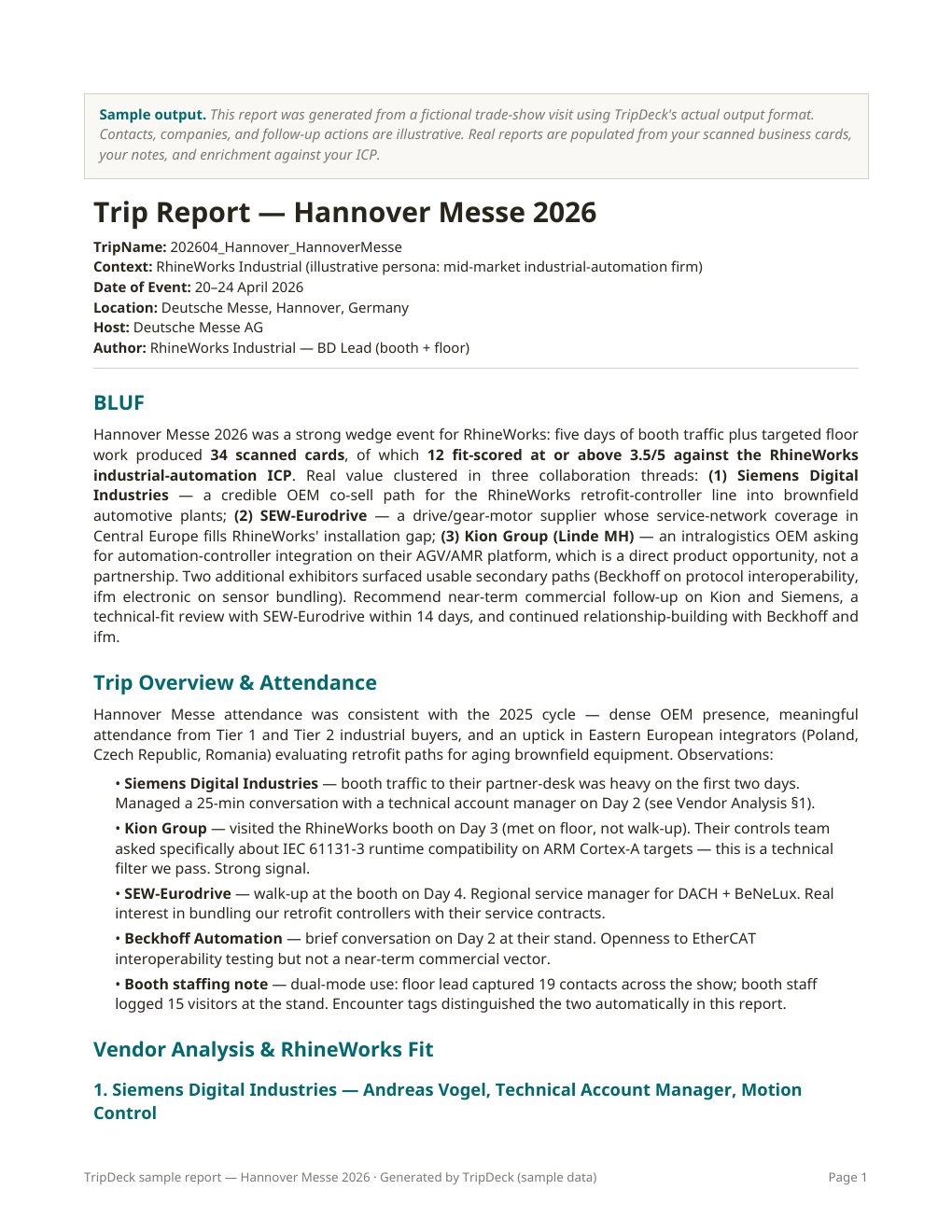
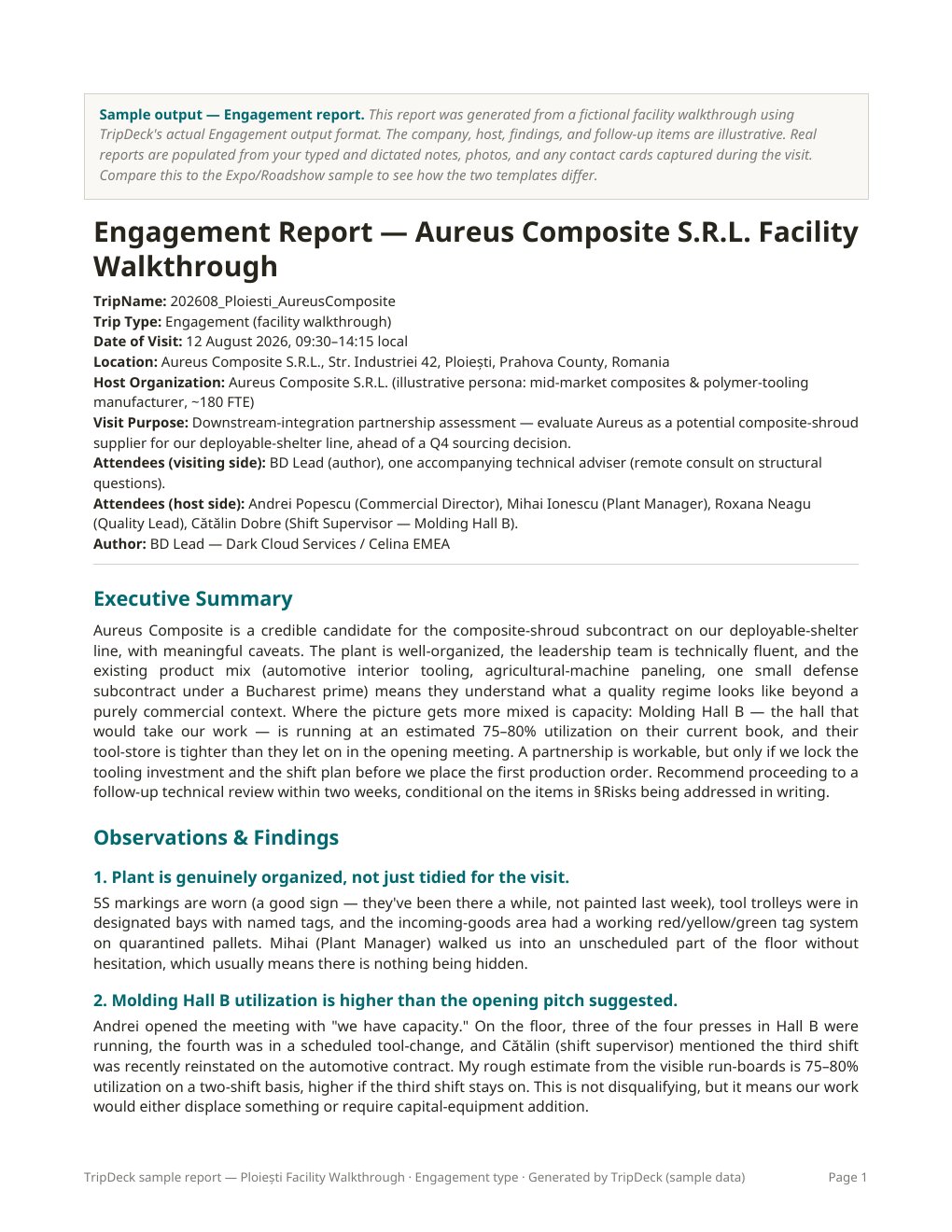
    Expo trips render as a ranked contact briefing. Engagement trips render as observations, findings, risks, and recommendations. Both include an follow-up actions based on your inputs. Generate an editable Word (.docx) report, saved to Google Drive when connected or downloaded directly in on-device mode. Review the report for accuracy and completeness before sharing.

Two workflows. One tool.

Not every trip looks like an expo. TripDeck knows that.

Most "trade show software" is built for the ten-person team running a booth. Most card scanners stop at the card. Most trip-report tools assume every trip is a floor of cards. Actual business travel is messier than that. TripDeck ships with two capture flows and two report templates — you pick the type when you start the trip, and the tool reshapes itself around it.

Expo / Roadshow — many contacts, ranked

For days on the floor. Business development, international sales, trade commissioners, industry scouts, booth staff. Enter contact details, tag encounters (Booth visit / Met on floor / Meeting / Social), and save conversation notes. Generate a ranked contact briefing with fit analysis and drafted follow-ups. Deep mode adds public-source company research at report generation.

Trips like Hannover Messe · ADIPEC · Bauma · Web Summit · InterTraffic · regional chamber trade missions.

Engagement — one visit, one story

For facility walkthroughs, customer site visits, partner assessments, and one-on-one strategic meetings. The trips where you take a hundred notes and one business card, not the other way around. Capture your observations in the engagement notes. Snap photos of the site and add captions. If a host hands you a business card, enter their contact details manually.

The report changes shape too: Site & Visit Details, Executive Summary, Observations & Findings, Risks, Recommendations, and a Follow-up Actions & Considerations list that is uncapped by design. If the visit produced 23 action items, all 23 are in the report — not a Top-5 summary.

Trips like a facility walkthrough at a supplier plant · a Friday site recon before a bid · a one-on-one strategic meeting with a partner · a customer visit.

The moat, spelled out

Card scanners are a dime a dozen. This isn't a card scanner.

01

Real research, not just contact extraction

Enter the contact and company details you collected. When you generate a Deep report, TripDeck researches public information to add company context. Lite reports work from your inputs without added web research. Neither mode starts automatically when you add a contact.

02

Fit scored against your business — or your other business

Set up a company profile once — what you do, who you sell to, what a good partner looks like — and every contact gets a 1-to-10 fit score with a plain-English rationale. Wearing more than one hat is normal here: keep a profile per line (consultants, fractional roles, two lines of business) and reassign any single contact to your other profile with one tap when the person you just met fits the other book.

03

A trip report a boss will actually read

Not a spreadsheet. Not 40 disconnected contact records. A proper document: executive summary, ranked contacts, per-conversation notes, follow-up plan with dates, and aggregate insights from across your trip. Formatted for people who wear ties.

04

Follow-ups you can send today

For every Priority 1 contact, TripDeck drafts a follow-up email and a LinkedIn message — specific to what you actually discussed and something recent about their company. Copy, edit, send.

05

Choose where your report files go.

Connect Google Drive for uploaded photos and generated Word reports, or choose on-device mode for browser-held photos and direct report downloads. TripDeck stores account information, company profiles, contacts, trip notes, and file metadata on its server in either mode. This is not a local-only app. OneDrive and Dropbox are not currently supported.

How trip follow-up gets done today

Compared to how you handle a trip right now.

Most BD professionals stitch this together from three or four tools — or don't stitch it at all. Here's what actually happens across the common approaches.

Capability The typical way Cards + spreadsheet + memory CamCard, Excel, Outlook reminders The CRM way HubSpot / Salesforce + Sales Nav Enterprise CRM plus LinkedIn The TripDeck way TripDeck Contacts and notes to report
Scans business cards Yes Add-on No: manual entry
Company research No Manual lookup Deep reports
Scores every contact against your business No No Yes
Drafts follow-up emails for each priority contact No Template only Yes
Delivers a consolidated trip report No No Yes
Handles trade shows and single-site visits Same tool for both Same tool for both Two workflows
Where contact and trip records are stored In your files Vendor database TripDeck server
Time investment per trip 4–6 hrs after 2–4 hrs after Done at the airport
Monthly cost $0–$5 $100–$200+ $19–$99

TripDeck currently uses manual contact entry. Deep research runs when you generate a report. Drive and on-device options apply to files, not all application data.

Feature, not fine print

Know what is stored, and where.

TripDeck is a server-based application with two file-storage options. Choosing on-device mode does not keep all your information off the server.

  • Google Drive files. When connected, uploaded photos and generated Word reports are saved to your Google Drive. OneDrive and Dropbox are not supported.
  • On-device files. Photos stay in this browser's storage between uses and are sent to the server when needed to generate a report. Reports download to your device. Save your own copies; clearing browser data or losing the device can remove locally held photos.
  • Server-stored information. Account information, company profiles, contacts, trip and engagement notes, and file metadata are stored by TripDeck regardless of your file-storage choice.
  • Processing is not local-only. Report generation takes place on the server and uses third-party AI services. Deep analysis also uses public-source research. Check your organization's data-handling rules before entering information.

Do not enter classified information, CUI, ITAR-controlled technical data, or third-party proprietary information. A connected Drive account does not automatically extend your organization's security controls to TripDeck.

Pricing

Start with a 14-day free trial. Choose your plan when you're ready.

Create an account without a card and try TripDeck with Solo's one-profile allowance. A card is required when you choose a subscription through Stripe. Review the trial end date and first payment date at checkout; subscriptions renew automatically unless canceled.

Free trial

$0
14 days from account signup
  • 1 company profile
  • Try the trip-report workflow
  • No card required at account signup
  • Choose a paid plan to continue generating reports after your trial
Start 14-day trial

Team

$49/mo
Card required at subscription checkout
  • Up to 3 company profiles
  • Everything in Solo
  • Team fit-scoring profile
  • Priority AI processing
  • Central billing
Create your account

Advisor

$99/mo
Card required at subscription checkout
  • Unlimited company profiles
  • Everything in Team
  • Custom-branded reports
  • For advisors, consultants, and firms with many portfolios
Create your account

A separate regulated-tier build (defense, aerospace, government contracting) is on the long-term roadmap and will open once TripDeck has earned SOC 2 Type II and ISO 27001. If that's your organization, join the waitlist — first in line when it opens.

Full refund within 30 days of your first paid subscription. No report-count limit and no questions asked. Email [email protected] to request your refund. After 30 days, fees are non-refundable except where required by law. See Terms of Service, Section 7.

FAQ

Questions you'd be right to ask.

Do I need to download an app?

No. TripDeck runs in your web browser on your phone, tablet, or computer. Create an account to get started; no App Store or Google Play download is required.

When do I need a payment card?

Account signup starts a 14-day in-app trial with Solo's one-profile allowance, without a card. If you choose a subscription, Stripe asks for a card at checkout and shows your trial end date and first payment date. Cancel before that payment date if you do not want to be charged. Signing up alone does not authorize a charge.

I already use HubSpot / Salesforce / Pipedrive. Do I need this?

Your CRM stores contacts. TripDeck writes the trip report. They're not the same job. Use the report alongside your CRM and transfer the details you need manually. Automatic CRM syncing and one-click CSV export are not currently offered.

How accurate is the research?

Lite reports work from your inputs. Deep reports add public-source research and source references. AI can make mistakes or miss details, so check the report, follow its sources, and verify important claims before sharing. Nothing gets sent for you.

What if I lose my phone?

Photos and reports already saved to Google Drive can be accessed through that account. On-device photos are held in the browser on that device and are not automatically copied to Drive or another device. Losing your phone or clearing browser data can remove them. Keep separate copies of important photos and downloaded reports.

Can I scan business cards or dictate notes?

Enter contact details manually and type or paste your notes. Automatic card scanning, in-app voice recording, and transcription are not currently available. Your device's own keyboard dictation, if available, is separate from TripDeck; its availability and data handling depend on your device and settings.

Does it work offline?

Use TripDeck with an internet connection to sign in, save changes, and generate reports. Do not rely on offline capture or automatic background syncing. In-app voice recording is currently unavailable.

I only travel three times a year. Is this worth $19/month?

If you like writing trip reports and do not want to get time back, then no.

How is this different from CamCard, Fathom, or Salesforce Einstein?

CamCard scans and stops. Fathom summarizes online meetings, not in-person conversations. Salesforce Einstein needs Salesforce. TripDeck does the one thing they don't: the trip report itself.

Who built this?

A business development team that got tired of the same Sunday-night ritual. We're small, we're focused, and we answer our own support email.

★ Founding member offer

First 100 customers on any paid plan lock in half-price for the first year.

A permanent discount off list pricing for your first 12 months. No countdown timer. No fake scarcity. A live counter shows how many seats remain.

Founding pricing

  • Solo — $9/mo for the first year (then $19/mo)
  • Team — $24/mo for the first year (then $49/mo)
  • Advisor — $49/mo for the first year (then $99/mo)

Founding members also get

  • Every future feature at no extra charge — CRM sync, mobile, team workspaces
  • Direct line to the founder for feature requests
  • Featured logo on our "First 100" wall (optional)

Why the half-price year? We want early customers to be BD professionals with strong opinions who will make this product sharper. If that's you, take the deal.

Join the first 100 →

Regulated tier

Working in defense, aerospace, or government contracting?

We are building for you next. Not today.

TripDeck was built by a defense-and-aerospace BD team, so we know the assignment. We also know that selling into your world means SOC 2 Type II, ISO 27001, and — depending on the contract — CMMC Level 2, FedRAMP Moderate, or ITAR-aware infrastructure. Those aren't features. They are audit programs that cost between $25,000 and $400,000 in the first year alone.

We would rather earn them than fake them.

Here is our commitment: once TripDeck's commercial tier proves the model, we will invest in the security certifications your procurement team actually asks for. The regulated tier will open when we can show you the audit report, not before.

  • First access the day the regulated tier opens.
  • Design-partner invitations — shape CUI, audit-log, and export features while they're being scoped.
  • Locked founding pricing for the regulated tier at launch.
  • Quarterly compliance-progress updates — short, honest. If we slip a milestone we tell you the same day.

Get in line for the regulated tier

Organization type
Compliance frameworks your procurement team requires
Data sensitivity your organization might require in a future product

Describe requirements only. Do not include CUI, classified information, export-controlled technical data, or third-party proprietary information.

Your form details will be processed by TripDeck and its email provider and emailed to [email protected]. No account is created and no automatic confirmation email is sent. The regulated tier is not a current product or an authorization to upload controlled information.

The next trip is coming.
Show up prepared to leave prepared.

Create your account and try TripDeck for 14 days without a payment card. Bring your meeting notes and contact details, then review your first trip report.

Create your account