Skip to content

Free resource / Editable Word file

Business trip report template: Word download and example

The trip is over. The useful details should not end up scattered across your notebook, phone, and inbox. Start with a clear format for what happened, why it matters, and what happens next.

3-page editable .docx · No signup · No payment details

See the fictional worked example

For sales, business development, customer visits, and industry events. This is a business debrief, not an expense claim or travel itinerary.

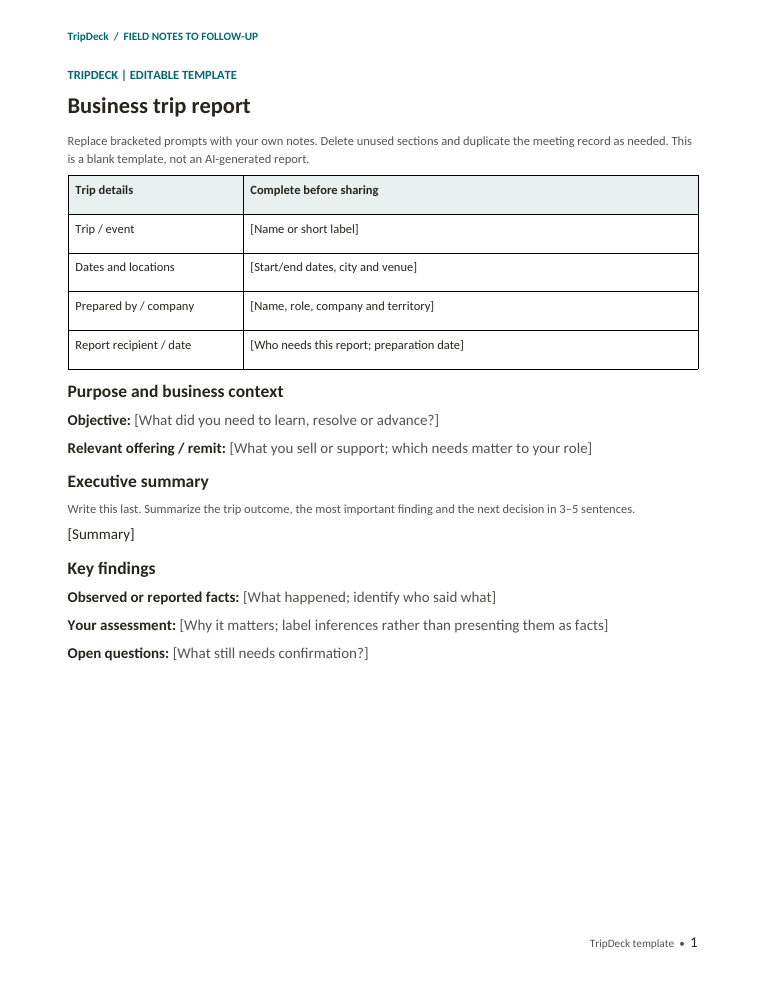
First page of the TripDeck business trip report template, with trip details, purpose, executive summary, and key findings.
The actual template, page 1 of 3. All text and tables are editable.

A practical trip report format

Three pages. One clear record.

Use the sections you need. Duplicate the meeting page for a multi-day trip and remove prompts before you share the finished report.

Trip brief and key findings
Capture dates, locations, purpose, your business context, the intended reader, and a short executive summary. Separate observations from your interpretation.
Meeting or session record
Record whom you met, the stated need, topics discussed, confirmed commitments, possible fit, and unanswered questions. Repeat this page for additional meetings.
Follow-up and management review
List actions, owners, timing, and whether each action is agreed or proposed. Finish with the decision or support you need and a pre-send check.

More specific visit formats

Choose the right template for the conversation.

Customer and sales visit template
For the customer's own needs, requirements, decision roles, and agreed next steps.
Dealer and distributor visit template
For channel fit, territory served, service and parts capability, and proposed mutual responsibilities.

How to write a trip report

Capture the facts. Then explain the value.

  1. Start with the purpose

    Explain what the trip was meant to accomplish and who will read the report. A manager needs a clear outcome and decision request, not a minute-by-minute diary.

  2. Record each meaningful conversation

    Include the organization, relevant roles, the actual need or issue, and what was said. Use “speaker unconfirmed” or “timing not discussed” when the information is missing.

  3. Separate evidence from assessment

    “The dealer asked about parts support” is a reported fact. “There may be a regional partner fit” is your assessment. Do not turn interest into an approved purchase or partnership.

  4. Make the next step specific

    Record the deliverable, owner, and timing if they were agreed. Otherwise write “Proposed,” “Unassigned,” or “To agree.” Note any question that must be answered first.

  5. Write the summary last

    Summarize the outcome, the most important finding, and the next decision. Check names, commitments, and attachments before sending.

Worked business trip report example

A regional equipment-sales visit

This short example shows how the template can work without inventing a successful sale.

Fictional example only. Names, organizations, dates, and conversations below are invented for illustration, not customer evidence.
Trip
Regional equipment dealer visits
Date / location
September 15–16, 2026 · Central Illinois
Prepared by
Alex Morgan, regional sales representative, Example Field Equipment
Reader
Sales manager and service lead

Purpose and executive summary

The trip explored dealer demand for compact material-handling equipment and the support required before a demonstration. Example County Machinery expressed interest in reviewing product specifications and parts support. Product fit remains unqualified: no budget, purchase timing, or dealer agreement was confirmed.

Meeting record

Alex met Jordan Lee, the fictional dealer's service manager. Jordan reported that service access and parts availability were important to their customer base and asked for maintenance information. No specific response-time commitment was requested or agreed.

Findings and opportunity assessment

Reported: The service manager requested specifications and maintenance requirements. Assessment: A demonstration may be useful if the product and support model fit local needs. The next step is qualification, not a sales forecast.

Risks and open questions

The dealer's sales decision-maker was not present. Expected demand, stocking requirements, service coverage, budget, and timing remain unconfirmed. Alex should not promise local parts availability until the service team validates it.

Follow-up plan

  • Agreed: Alex will send the standard specifications and maintenance information. Timing was not agreed.
  • Proposed: Ask the dealer to include its sales lead in a requirements call. Alex to coordinate; date to agree.
  • Internal decision requested: The service lead should confirm the support options before any demonstration proposal. Owner and review date require acceptance.

Why this works: interest, evidence, unknowns, and next steps are visible without implying a committed order.

Choose the approach that fits

Use the template yourself. Or draft from your trip notes.

The free Word template

Gives you the structure. You write the summary, assess the conversations, and maintain the follow-up list. Downloading it does not create a TripDeck account or start a trial.

TripDeck's paid product

Uses your saved business profile, trip notes, and contacts to draft a structured report and suggested follow-ups. Review the output before sharing. The blank template and the app's generated report layouts are not identical.

Explore trip report software, the trade show workflow, or site visit reporting.

The 14-day account trial requires no card. Choosing a subscription later opens card-required Stripe checkout; review its billing date and terms before confirming. See Terms.

Before you download

Trip report template questions

Is this Word template really free?

Yes. Download the editable .docx without an account, email address, or payment details. TripDeck subscriptions are separate.

Can I use it for customer visits and trade shows?

Yes. Use one meeting record for a customer visit, or repeat that page for multiple conversations or sessions during an event. Remove sections that do not apply.

How long should my completed report be?

Use enough detail to support the reader's decisions. The download starts with three pages, but it is editable: shorten it for a simple visit or add meeting records and approved attachments for a longer trip.

Does the download upload my notes to TripDeck?

No. Downloading and editing the Word file does not send its contents to TripDeck. If you later paste notes into TripDeck or another AI tool, that service's processing and privacy terms apply. Follow your employer's rules for your chosen editor and storage.

Is this an expense report or an official government form?

No. It is a general business-trip debrief template, not an expense reimbursement form, an official reporting standard, or a compliance certification.

Can I paste the completed report into an AI tool?

Only if you are authorized to share its contents with that service. Do not upload classified information, CUI, controlled technical data, or confidential third-party information you are not permitted to share.